Normal Browser Window vs. Private Mode: Which Browser Actually Protects You in 2026?
Stop trusting Incognito Mode. Most private windows are just a blindfold : they hide your history from your spouse, but not your data from big tech. Lab Invisible tested the top 5 browsers to see which one actually stops tracking.
5/8/20244 min read
What is a Private Browser Window?
A private browser window (often called Incognito or InPrivate) is a feature that prevents your device from saving local history, cookies, and cache. However, it does not hide your IP address or stop browser fingerprinting.
In our 2026 forensic tests, we found that despite the "spy" icons, most browsers leak your unique digital signature even in private mode.
The Methodology: How We Tested
We didn't just look at the UI. We audited the data stream using three primary benchmarks to simulate a hostile tracking environment:
AdBlock-Tester.com: To measure resilience against advertising scripts and invisible trackers.
CoverYourTracks.eff.org: To analyze how unique and identifiable the browser's "fingerprint" is.
BrowserLeaks.com/Canvas: To extract the Canvas Hash and WebGL fingerprint—the "serial number" of your browser session.
The Control: We compared Standard Mode vs. Private/Incognito Mode for every browser to see if the "privacy" features actually changed the digital signature.
Browser Privacy Test Results (2026 Benchmarks)
We compared Chrome, Edge, Opera GX, Firefox, and Brave. We tested for signature leaks, ad blocking efficiency, and canvas fingerprinting.
Google Chrome: The "Blindfold" Effect
Status: COMPROMISED Engine: Chromium
We started with the market leader. The assumption is that Incognito blocks data. The reality is the opposite.
The Signature Test (BrowserLeaks):
Result: IDENTICAL.
Analysis: We compared the Canvas Hash in normal tabs versus Incognito. The hash matched perfectly. This means your "fingerprint" is visible and linkable, regardless of which mode you use. Google knows it's you.
The Ad-Block Benchmark:
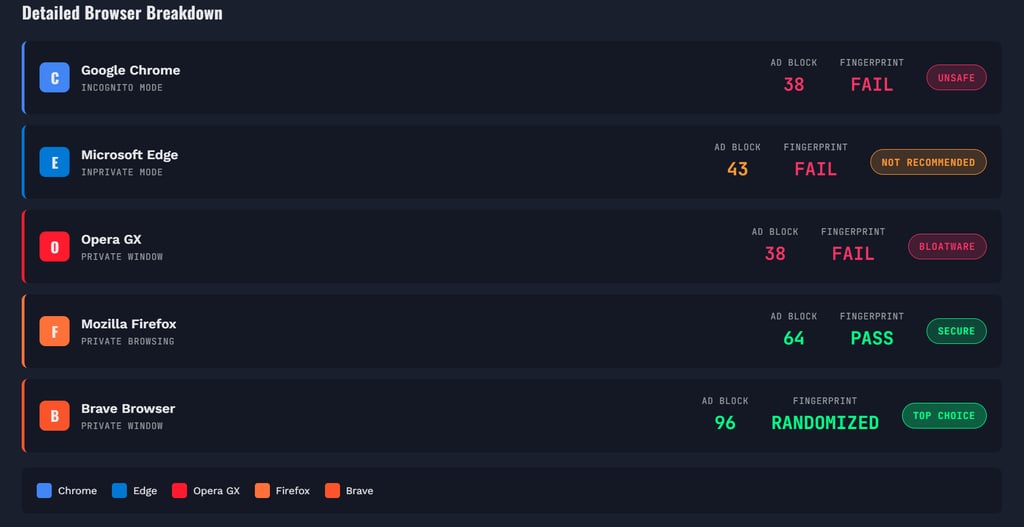
Normal Mode: 43 Points.
Incognito Mode: 38 Points.
Analysis: The experience actually gets worse in Incognito. Why? Because Chrome disables your protective extensions by default in Incognito, but it doesn't block the native trackers. You are more exposed in private mode than in normal mode.
CoverYourTracks (EFF):
Result: FAILED.
Leakage: Exact screen resolution and hardware concurrency were exposed.
Lab Verdict: Chrome Incognito is one of the worst ideas for privacy. It is useful only for local secrecy (hiding history from family), not for Digital Sovereignty.
Microsoft Edge: Internet Explorer 2.0
Status: BLOATWARE Engine: Chromium
Edge is the evolution of Internet Explorer, and it shows. It is heavy, bloated with MSN news feeds, and aggressive with messages.
The Signature Test:
Result: IDENTICAL.
Analysis: Like Chrome, the InPrivate window leaks the exact same Canvas Hash as the normal window. No surprise, given the shared Chromium base.
The Ad-Block Benchmark:
Normal Mode: 38 Points.
InPrivate Mode: 43 Points.
Analysis: Inverse results to Chrome. InPrivate mode was slightly better here, but the scores are still abysmally low.
CoverYourTracks:
Result: FAILED.
Leakage: No tracking protection active. Resolution and hardware info leaked instantly.
Lab Verdict: Edge is not a privacy tool; it is a telemetry collection hub for Windows. Avoid.
Opera GX: The "Gaming" Gimmick
Status: MARKETING PLOY Engine: Chromium
Opera GX markets itself to gamers, but our forensic install analysis raised immediate red flags.
Installation Behavior:
Observation: The browser demands data collection consent. Even when we manually unchecked every data-sharing box, Opera GX forced itself into the Windows Startup list. We had to manually kill it in Task Manager. This is behavior typical of malware, not privacy software.
The Benchmark:
Score: 38 Points (Normal) vs 38 Points (Private).
Analysis: No difference. The "GX Control" features consume high resources (CPU/GPU acceleration) without offering any protection against browser fingerprinting.
CoverYourTracks:
Result: FAILED.
Leakage: Signatures are identical. It blocks some generic trackers, but your hardware identity is fully exposed.
Lab Verdict: A resource-heavy "skin" for Chromium. Good for UI customization, terrible for privacy.
Firefox: The First Line of Defense
Status: SECURE (Tier 2) Engine: Quantum (Gecko)
This is where the test changed. Firefox was the first browser to show a measurable difference between modes.
The Signature Test:
Result: UNIQUE.
Analysis: In normal mode, the signature leaked. But in Private Mode? The signature changed. This is due to Firefox's "First Party Isolation." It separates the data buckets, making it much harder for cross-site trackers to link your sessions.
The Ad-Block Benchmark:
Normal Mode: 38 Points (Standard).
Private Mode: 64 Points.
Analysis: A massive jump in protection. Private mode effectively blocks a significant portion of trackers out of the box.
CoverYourTracks:
Result: PASSED (Partial).
Analysis: While it still leaks some resolution data, the randomization of the First Party Domain is a major win over Chrome and Edge.
Lab Verdict: The best "traditional" browser. If you want speed and decent privacy without configuration, Firefox Private Mode actually works.
Brave Browser: The Hyped King?
Status: TOP TIER (Tier 1) Engine: Chromium (Hardened)
Brave is hyped by the privacy community. We wanted to see if it was just marketing. The data says it's real.
The Signature Test:
Result: 100% UNIQUE.
Analysis: This is the game changer. Brave doesn't just block trackers; it fakes your data. It randomizes the Canvas and WebGL hash. Every time a tracker asks "Who are you?", Brave gives a different answer.
The Ad-Block Benchmark:
Score: 96 Points (Normal & Private).
Analysis: It effectively nearly maxed out the test in standard mode. You don't even need to open a private window to be safe.
CoverYourTracks:
Result: PASSED (Star Performer).
Analysis: Brave was the only browser to report false information for screen resolution and hardware inputs. It actively poisons the data well, making fingerprinting impossible.
Lab Verdict: A clear winner. Brave provides the best Browser Fingerprinting Protection out of the box, period.
How to Stop Browser Fingerprinting
To stop browser fingerprinting, you cannot rely on standard "Incognito" modes. You need a browser that actively randomizes your Canvas and WebGL hash.
Our Recommendation:
Switch to Brave or Firefox: These are the only two that passed our signature tests.
Use a No-Log VPN: A private window cannot hide your IP. Pair your browser with a verified VPN.
Conclusion & Lab Recommendation
The data from BrowserLeaks and CoverYourTracks is irrefutable.
Chrome/Edge/Opera: You are exposed. Private mode is a UI feature, not a security feature.
Firefox: A solid improvement that isolates your session.
Brave: The only tool that actively fights back by randomizing your digital fingerprint.
For 90% of users, standard Incognito mode is a false sense of security. If you want real privacy, uninstall Chrome and Edge. Install Brave for maximum protection or Firefox for a balanced experience.
Stay hidden. - Lab Invisible